Cost & ownership
“Free to edit” should not be a surprise at export
Why a paid effect can stop a free export, what CapCut’s own guidance says, and the five-minute test to run before editing a whole project.


The worst moment to learn the limits of a free editor is when the video is finished. You have fixed the pacing, added captions, found a title you like and lined up the music. Then Export opens a subscription screen. Whatever the reason, the decision now feels different: paying buys back the hours you have already spent.
That experience deserves a precise explanation. “CapCut makes every export paid” is too broad. CapCut’s own help says an upgrade prompt can appear when a project includes paid features or materials. A project can look finished in the preview and still contain something that needs Pro at export. [1] Its separate export guidance also distinguishes trying advanced features from exporting a video that uses them. [2]
The problem is discovering the boundary too late
A community thread describes someone who believed they had used only free features but still encountered a Pro prompt. That is useful evidence of confusion, not proof of what every version, device or region allows. [3] Product plans change. A specific user’s screen cannot stand in for the current policy everywhere.
The practical question is simpler: can this account, on this device, export this project using these assets? You do not need an argument about the whole company to answer it. You need a short representative test.
Look carefully at anything with a crown, badge, trial label or premium marker. Check the caption style, transition, music, background-removal option and export setting. An ordinary-looking choice can still be tied to a paid tier. Preview access and export access are separate permissions in some products.
Run the export test before the edit
Make a ten-second scratch project before starting the real job. Use a clip from the same camera, one caption in the style you intend to use, a title, a music track and any effect you expect to rely on. Export at the actual delivery resolution. A basic default export tells you very little if the client needs a different format or your planned style includes paid materials.
- Check the exported file for a watermark, ending card or unexpected branding.
- Play it outside the editor and listen to the audio.
- Confirm the resolution and frame shape are what you selected.
- Reopen the project and change a caption; verify that you can export the revised version too.
- Record which paid assets or settings were involved, so the full project does not quietly add them later.
This is a small habit with a large payoff. It catches cost boundaries, but it also catches missing fonts, black frames, mismatched aspect ratios and effects that render differently from the preview. A successful preview is not the finished deliverable.
What to do when an upgrade prompt appears
First save the project. Read the prompt and identify the features it names. If there is a paid transition, replace it with a cut or a free transition and try another short export. If the issue is a premium caption treatment, preserve the words and timing before changing the visual style. You want to keep your editorial work even if you remove a decorative choice.
Work through one suspected feature at a time. Changing everything at once can make the export succeed without teaching you which choice caused the problem. If the editor cannot identify the paid element clearly, its support documentation is a better starting point than an old tutorial for a different version.
Avoid downloading unofficial installers advertised as ways around a subscription. Apart from the trust problem, they can put your project on a version a collaborator cannot reproduce. For a client job, predictable files and a supported workflow matter more than a clever workaround.

Ask better questions about a free editor
“Is it free?” is the beginning of the conversation. Follow it with: free for which exports, which assets and which account? Does transcription have a separate allowance? Can you save the project and revise it later? Does an AI feature use a provider that bills you independently?
A free desktop edition such as DaVinci Resolve is another option to evaluate, alongside paid products and newer tools. [4] Choose with your actual delivery needs in view. There is little value in winning a pricing comparison if the chosen tool cannot handle your footage or the revisions your work requires.
Bhippi’s early-access offer
Bhippi is currently giving free tester keys. Claim your key and download during early access, and you keep Bhippi free for life. The account dashboard is where you get the key and Windows installer. There is no need to invent a countdown to explain the offer: it is available during the current tester period.
In Bhippi, the edit lives on a multi-track timeline you can inspect and change. You can work manually or ask the AI to make a first pass. Connect your AI providers if you want AI help; any provider charges remain separate. Local generation and speech tools require the relevant models to be installed and enough hardware to run them.
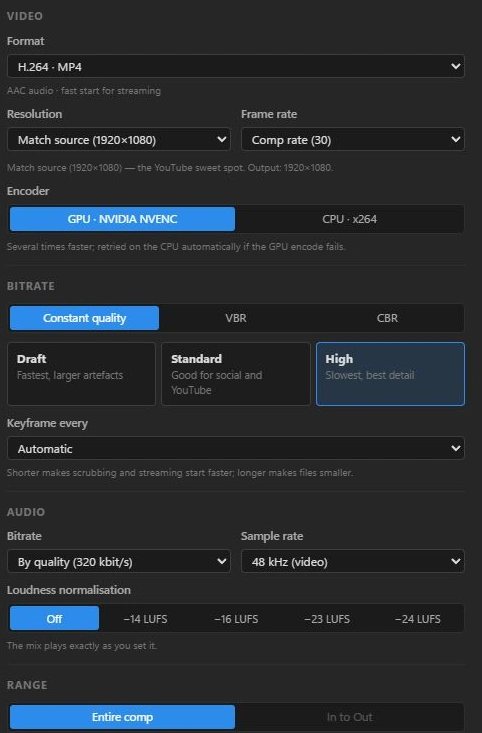
The same export test still applies. Try your captions, your footage and your intended delivery preset. If you are evaluating early-access software, finding a rough edge before a deadline is useful feedback. Finding it after three hours of editing is a much harder afternoon.
Make the last step the first check
The export button is part of the product, not an afterthought. A good trial ends with a file you can actually deliver and a project you can revise. Give those two things priority over the number of effects in the library.
Before your next edit, spend five minutes producing a tiny version of the job. You may discover that the free tier does exactly what you need. You may discover that a paid plan is worth it. Either answer is better before you have invested the whole evening.
Save a tiny delivery checklist
Before a client job, write down the delivery requirements in terms you can check: container, codec, frame size, frame rate, caption treatment and whether an editable project is included. “A good-quality video” leaves too much room for misunderstanding. A short checklist gives you a target when the export panel presents several similar-looking choices.
Try a ten-second sample with the exact title, font, effect and music you intend to use. Open that file in another player and check the beginning and end. Send the sample through the same review or upload path you will use for the finished video, if that is part of the job. A file that plays on your computer is only one part of a successful delivery.
Keep the source project after exporting. If somebody asks for a spelling correction, you should be able to change the title and render again without rebuilding the whole sequence. That small recovery test belongs in your definition of free and usable.
FOLLOW THE EVIDENCE
Sources & notes
Checked October 1, 2026. Community posts describe individual experiences, not a representative survey. Vendor policies and pricing can change. Workflow examples are illustrative; these articles do not present a hands-on comparative benchmark. Bhippi publishes this blog and makes the editor discussed here.
- CapCut: why a Pro prompt appears when exporting Official help
Explains that paid features or materials in a project can trigger an upgrade prompt.
- CapCut: joining Pro for exporting Official help
Explains the distinction between previewing advanced features and exporting with them.
- CapCut community: a Pro prompt despite using free features Community discussion
A user-reported experience; does not establish a universal free-export rule.
- Blackmagic Design: DaVinci Resolve Official product information
A separate free edition exists alongside Studio.